Authentication Configuration
On the "Authentications" tab, you can configure the authentication method for a user. Orchestra supports two authentication methods: password-based and certificate-based.
The following types of certificates are supported:
- Client certificates
- SSH certificates
- X.509 certificates (PKCS#12)
Below are the authentication options available in Orchestra:
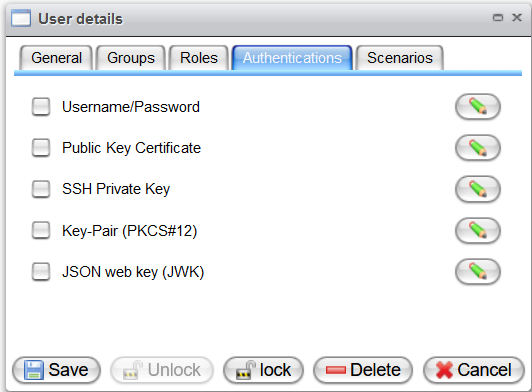
The most commonly used method is password authentication. Instead of setting the password directly in this dialog, you can configure Orchestra to authenticate the user against an LDAP directory server.
To set up an authentication method, enable the checkbox next to your desired method. Then click the edit button located to the right to set the password or upload the certificate. Click the "Save" button to complete the process, while clicking "Cancel" will discard your changes.
Username/Password
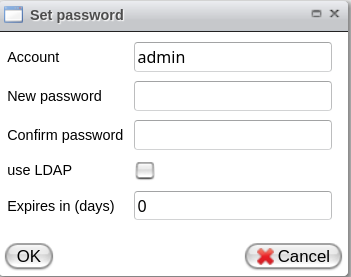
To set the password for the user, configure the following parameters:
- Account: The username
- New password: A password for this user
- Confirm password: Confirm the password for this user
- Use LDAP: Configure Orchestra to authenticate the user against an LDAP directory server
- Expire in (days): Password expiration. If the password expires, the user will be required to change the password.
You can configure a default value in the Environment settings using the key password.expiration.days in the group "Security".
Public Key Certificate
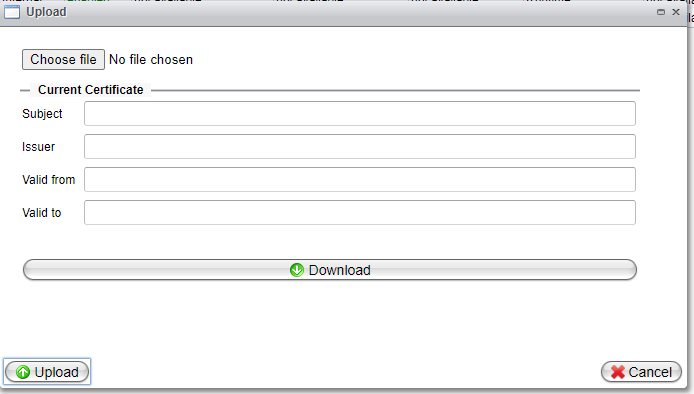
To set Public Key Certificate authentication, click "Choose file," select a certificate file from your local file system, then click "Upload."
SSH Private Key
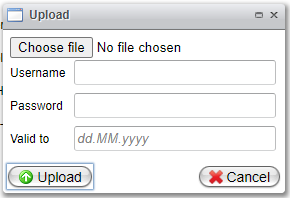
To set SSH Private Key authentication, click "Choose file" and select a private key file from your local file system. Then configure the following parameters:
- Username: Credential name
- Password: A password for this user
- Valid to: Date when the certificate will expire
Finally, click the "Upload" button.
Key-pair (PKCS#12)
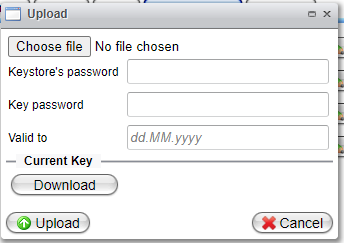
To set up Key-pair (PKCS#12) authentication, click "Choose file" and select a file from your local file system. Then configure the following parameters:
- Keystore's password: The password to the keystore
- Key password: The key password
- Valid to: Date when the certificate will expire
JSON Web Key (JWK)
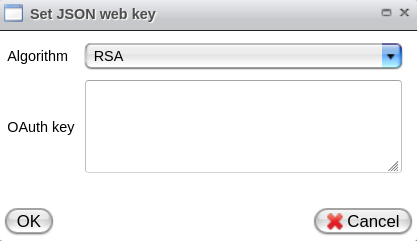
To set the JSON Web Key for the user, configure the following parameters:
- Algorithm: The algorithm used to verify a JWT. This is only required if an OAuth key is provided. Supported algorithms are:
- RSA: RS256, RS512
- OCT (HMAC): HS256, HS512
- EC: ES256, ES256k, ES512
- OAuth key: Key used to validate the JWT. Supported keys include:
- JWK (JSON Web Key)
- Base64 encoded X.509 Certificates
- Public Keys
Notification
Orchestra can send notifications when the authentication data is nearing expiration via system events and email.
- To configure the conditions and frequency for sending notifications, see the section on "Environment Settings - Security".
- To configure email notifications, refer to the section on "Environment Settings - Event Engine".